
For as long as I can remember, analytical and transactional processing have been strictly separate. It’s a simple rule: transactional systems for your transactions, data platforms and reporting tools for analytics.
But the request would often come anyway: “Can I use my Power BI report to write data back?” A feared mix of a reporting tool pushed into the role of a transactional system. The answer was usually: yes, but you’d be misusing the tool, by combining Power BI, Power Automate and Power Apps. Anyone who has built that can tell you it was not optimal.
With Fabric Apps, mirroring and shortcuts, these “write back” scenarios should become much easier. In this article I show two architectures to realize them, and what I learned building both.
At the moment of writing this article Fabric Apps is in preview and should be used for experimentation only, not in production environments. Full code & data available here
What is Fabric Apps?
Fabric Apps lets developers build managed web applications in Microsoft Fabric. Microsoft takes care of the database, frontend hosting and authentication, so you can focus on the application itself.
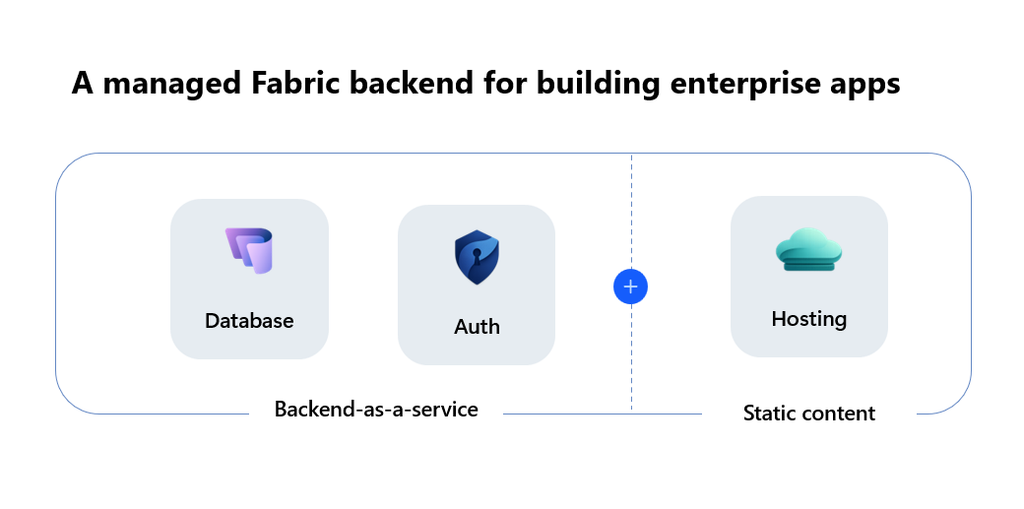
The frontend is React in TypeScript and the backend is a SQL database. In between sit functions that move data between the database and the frontend, and connectors that read from a Fabric lakehouse, warehouse, semantic model or KQL database. Behind the scenes, much of this is handled by Rayfin, Microsoft’s backend-as-a-service engine.
Our use case explained
To test Fabric Apps for write back, I want to build an app for correcting revenue numbers in a sales table. The data contains 5000 dummy transactions, plus dimension tables for stores and products that give context to each transaction.
The app must meet three requirements:
- Preserve the original. The original sales data is kept in a separate location, so we can always see what the input was.
- Allow corrections. Users can correct the revenue column, and corrected records are easy to identify.
- Keep an audit log. A full log tracks every change made over time.
For this use case I build 2 apps that match in look and feel, but have a different architecture:
- SQL database approach: Ingest the input data into the SQL database and do CRUD on top of it. The full dataset lives in SQL.
- Semantic model + SQL database approach: Read the input data through a semantic model and write only the corrections to the SQL database. The corrections are added to the same semantic model in Direct Lake mode.
Scenario 1: Write back with the SQL database
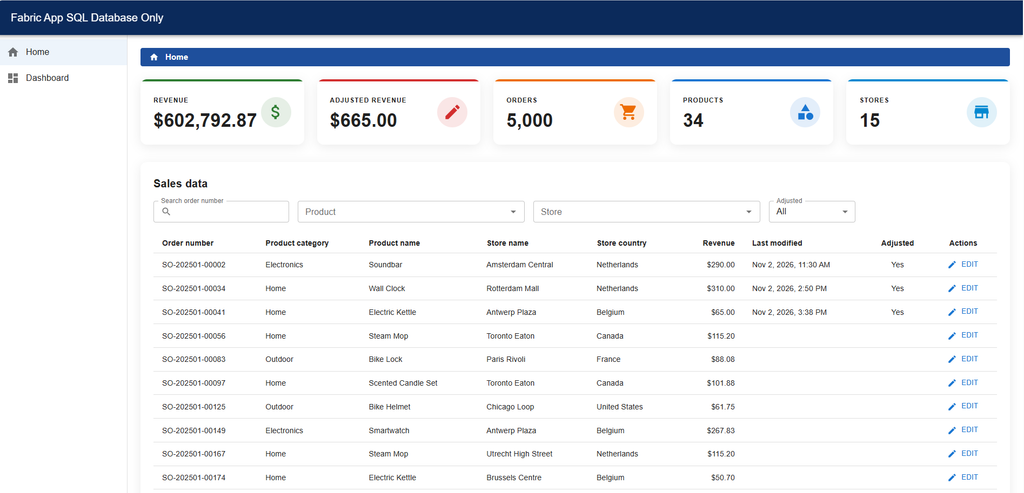
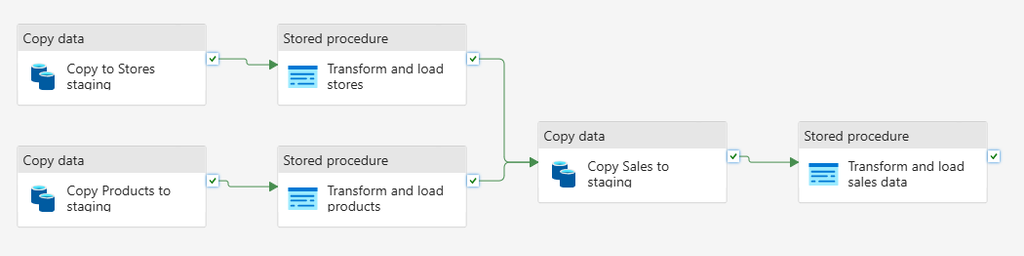
The first scenario is the full SQL route. The dummy data is loaded into a lakehouse, in the dbo schema. A pipeline copies that data into the SQL database behind the app. The app displays the data and lets users adjust the revenue. The tables holding the corrections are added back to the lakehouse through a shortcut, in a new schema called sql_db_app.
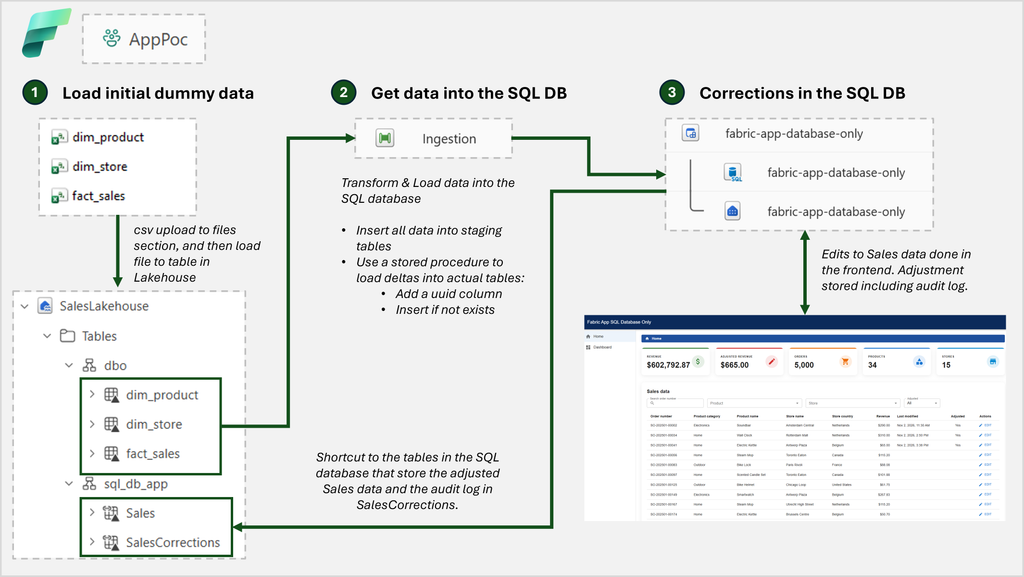
On the edit page, users can change a record and see the full audit log of changes to it.
The original sales data stays in dbo.fact_sales. The current sales data (adjusted and not adjusted) is in sql_db_app.Sales, and the full audit log of changes is available in SalesCorrections.
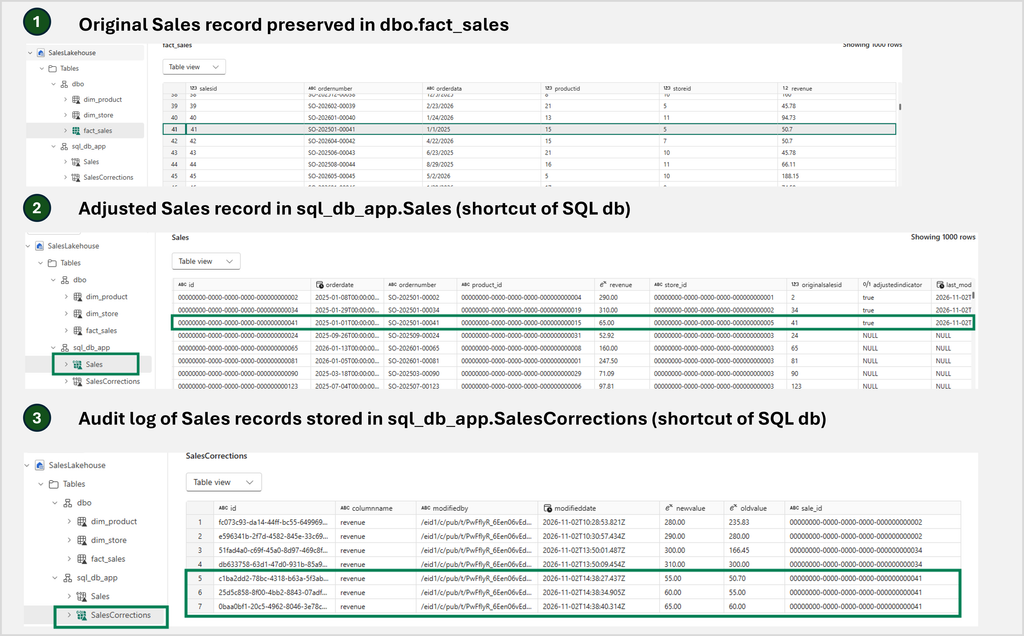
Overall, this scenario works really well. Having the complete data in the database feels solid. CRUD is fast, joins happen on the server, and results appear instantly.
There were challenges too:
- Incremental loading was tricky. I ended up with staging tables in the SQL database that are upserted every day. A stored procedure then inserts only the records that don’t exist yet into the real table. It doesn’t update existing ones, because those changes happen in my app.
- Transformations are required. fact_sales links to dim_store and dim_product through foreign keys. My keys were integers, but Fabric Apps defines foreign keys as UUIDs, so the stored procedure also converts the IDs.
Scenario 2: Write back with the Semantic Model
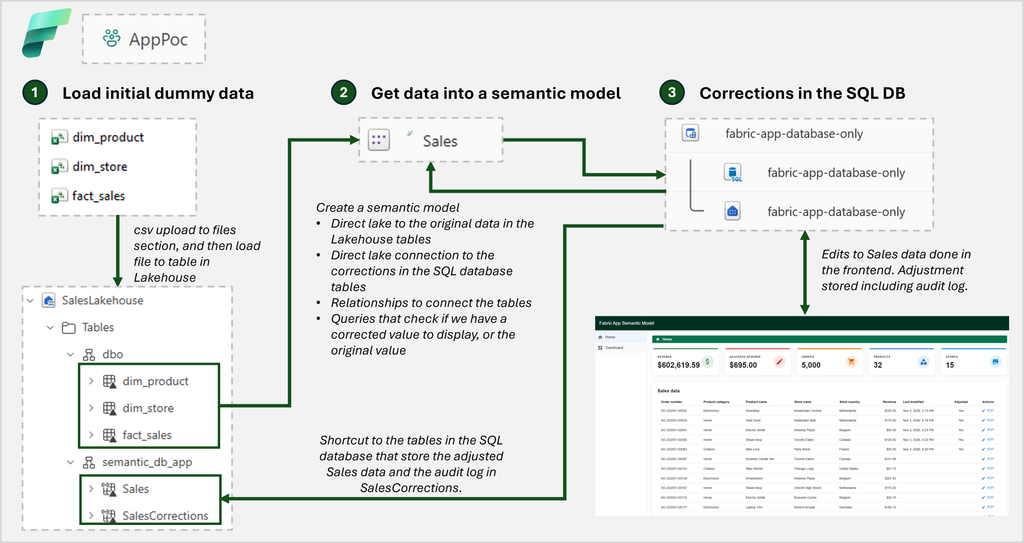
The second scenario is the semantic model route. The dummy data is loaded into a lakehouse, in the dbo schema, and the corrections are stored in the SQL database. The lakehouse tables and the SQL tables are connected in one Sales semantic model, both through Direct Lake.
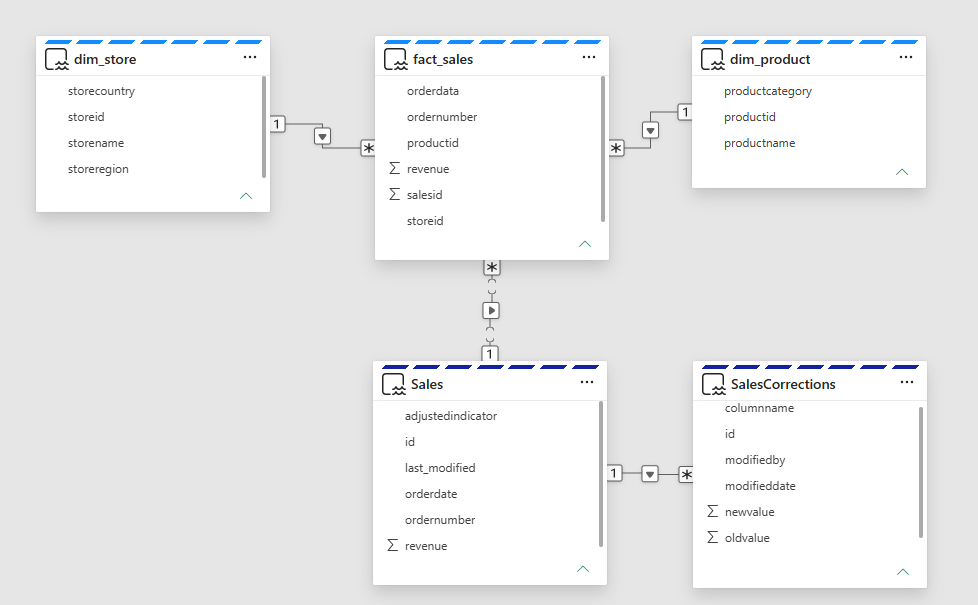
In the model below, the light blue tables are the original data and the dark blue tables hold the corrected data. The relationships let us write one query that shows the fact_sales revenue unless there is a correction, in which case it shows the corrected revenue.
Updating the record works, just like the first scenario!
Getting data into the app is much easier here. There’s no pipeline to run, because the app reads straight from the semantic model, which reads from the lakehouse through Direct Lake. Adding relationships, measures or tables is easy, and the semantic model can be reused for other things, such as Power BI reports.
There are drawbacks too. In a perfect world, you’d only query the semantic model to read and display data. But after a correction is saved, it takes 30 to 60 seconds before the change shows up in the semantic model (that makes sense, but it can confuse users).
That leaves you with two options:
- Accept the latency, meaning that users don’t see their change reflected right away.
- Add additional logic that takes the value from the SQL tables when the semantic model hasn’t caught up yet, which means a query that reads from two sources.
I implemented option 2. It adds code and complexity and reduces scalability. Therefore, I would not recommend it.
Which scenario is superior?
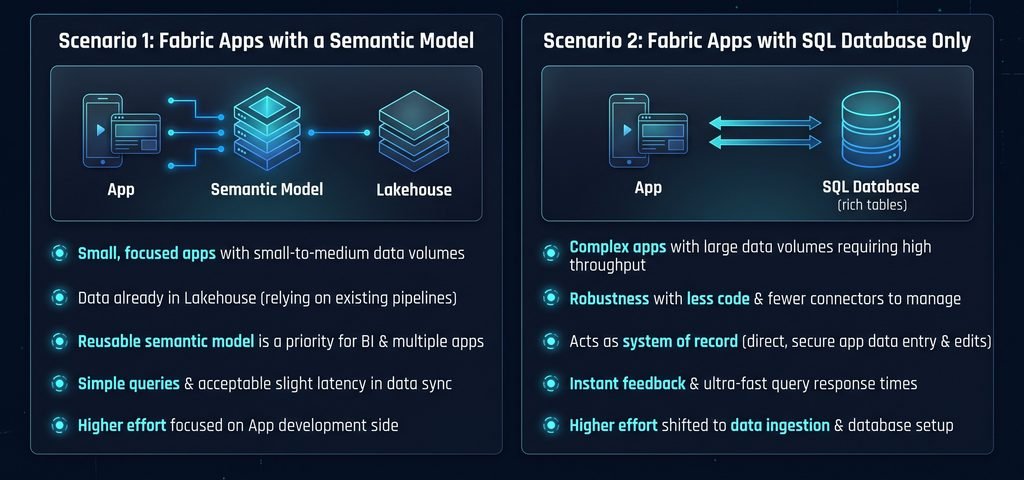
Both scenarios have their own pro’s and cons. I would choose the semantic model when:
- You build small focused apps with small to medium data volumes
- With data that lives in your lakehouse already
- A reusable semantic model is important
- Simple queries matter
- Users can accept a small delay
The SQL database route shines when:
- Your app is more complex, or needs to work with larger data volumes
- You need robustness and less code (the semantic model route uses more connectors)
- The database is the system of record (when data is entered in the app, not loaded from somewhere else).
- Users expect instant feedback
During the PoC I clearly noticed that the semantic model route means more effort on the App development side, whereas the SQL database approach moves effort to the ingestion of data.
Fabric Apps in general
Overall, I like what Fabric Apps offers. I think it will be great for small, focused apps that support CRUD. The default setup comes with agent skills, which makes AI-led development easy. If you’re used to React, the frontend will feel familiar, and the range of data sources you can connect opens up a lot of possibilities.
I did face some challenges:
- There were several npm warnings and some small bugs (functions, connectors).
- Project structure. The number of files and folders can be overwhelming.
- Always connected to Fabric. Even during local development you work against the Fabric database and capacity, which can be slower than a local database.
Next I will try out something similar on Databricks Apps, to see how it compares!
At the moment of writing this article Fabric Apps is in preview and should be used for experimentation only, not in production environments. Full code & data available here